Choctaw Landing Events Posting Requirements
To add an event (Non-Gaming Events Only) to the Choctaw Landing website, the following information is needed when a request is submitted. This can be found under the “Project Details” section in Workfront.
Required Fields
All fields are public-facing
- Event Title – title of the event
- Event Brief Description – a brief description, a sentence or two in length (please do not repeat event title, event date(s), event times, or event location in this description). If posting multiple shows for the same band/artist this field will have to differ slightly for each show for SEO purposes.
- Event Categories – please include at least one of the following categories:
- entertainment
- cultural
- movies
- Event Date(s) – a start date is required; if it’s a multiple day event please include an end date.
- Event Time(s) – a start time is required; if it’s a multiple day event an end time is required.
- Event Location – a location is required; if an event takes place at multiple locations these will need to be separate events for web use. Common locations:
- Casino
- Cypress Lawn
- Center Bar
- Cultural Booth
- Double Hearts Weddings
- Oka Sita
- Tiak Conference Room
Required Image
An image is required for an event to be added to the website.
Swiper Image – 1272x1884px/72ppi image (JPG format) or graphic (PNG format) that does not include any overlay text.
Optional Field
Event Description – a longer description to provide more details about an event, such as how to register or additional information. (please do not include event title, event date(s), event times, or event location within this description).
Additional ACF Fields: Get Tickets
Added 06/12/2026
A new feature has been added to events with tickets! The events archive page (/events) now includes a “Get Tickets” and “Get Details” button. To power this section, three new fields have been added:
- Is Ticketed Event (Yes/No)
- Tickets Link (URL) — conditionally rendered if ticketed event or not
- Is Sold Out (Checkbox) — conditionally rendered if ticketed event or not
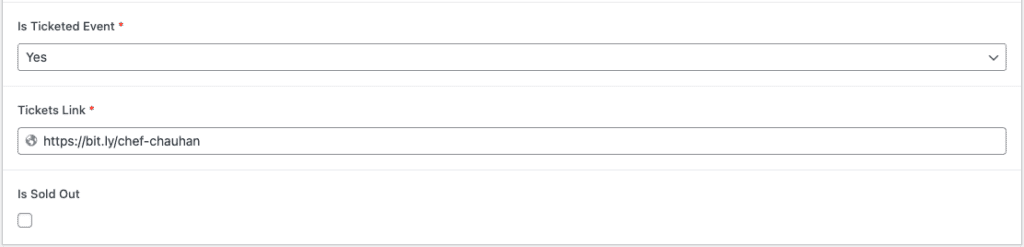
The tickets link automatically injects the new “Get Tickets” button on the event card on the events archive page as well as in the Event Description on the event single (inner) page. This new “Get Tickets” button on the inner page also automatically injects the “Ticketmaster is the official ticketing agent of Choctaw Landing” text .
The “Is Sold Out” checkbox adds a “Sold Out” overlay to the event card and disables the button on the event inner page.
Template
Download this template to complete the needed required fields for an Events Workfront request.